
Demo
How it works
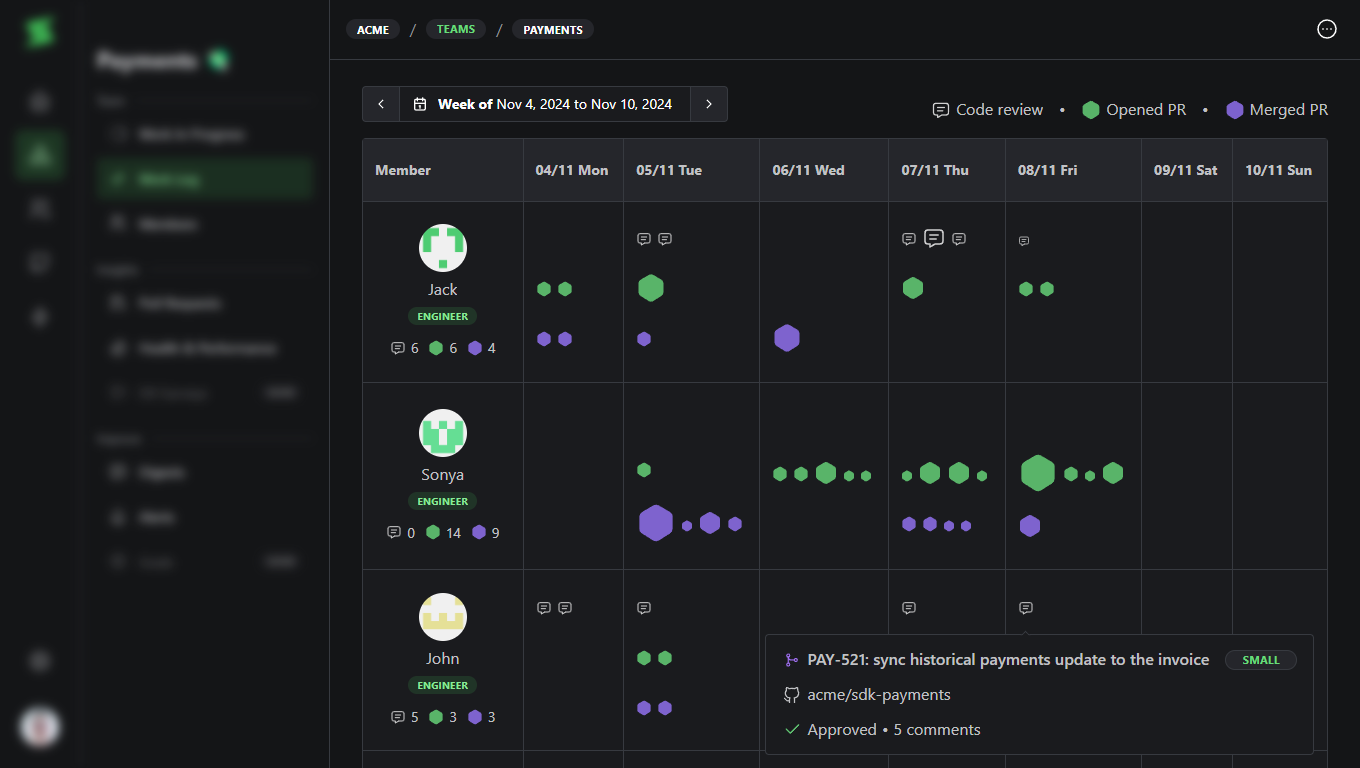
A weekly view of your team’s pull requests and code reviews. Each icon represents a PR or review, and grows in size with the change. Spot where work flows, where it piles up, and where it’s stuck. Contributions from each team member are organized by day and grouped into three categories:- Opened PRs (green hexagons)
- Merged PRs (purple hexagons)
- Code reviews (speech bubble icons)
Use it to
For leaders
- Spot workload imbalance: Quickly see if work is spread evenly or if someone is consistently overloaded.
- Prepare for 1:1s: Walk into conversations with concrete context on what happened that week, not just gut feelings.
- Recognize effort, not just volume: Fewer, larger icons mean someone tackled a big piece of work. Not every week needs a wall of dots.
- Check in early: A quiet week can mean someone is blocked. Use it as a signal to offer support, not to judge.
For individual contributors
- Build your brag document: Use the Work Log to highlight contributions during 1:1s or performance reviews.
- Support promotion cases: Provide concrete evidence of high-impact work and consistency over time.
- Document growth: See your progress over time and identify areas where you’ve improved or taken on more complex tasks.